That photo you are looking at? Hover it, click 🧩, it is a puzzle.
Any image on any page — a painting on a museum site, a travel photo, the kids on the beach — becomes a jigsaw with real pieces in your browser. Pick 12 to 300 pieces, leave it half done, come back tomorrow. Nothing is uploaded anywhere.
Add Jigsaw Anything to Chrome — free
- Real tab-and-blank pieces, 12 / 24 / 48 / 96 / 150 / 300
- Progress saved per picture, up to 30 puzzles in progress
- Your photos stay on your device
Puzzle sites give you their pictures; you wanted yours
Online jigsaw sites come with a catalogue of kittens and sunsets, a sign-up wall for custom images, and an upload step that sends your family photos to a server you know nothing about. The picture you actually wanted to piece together is on the page in front of you — and there is no way to get it from there to a puzzle board without saving, uploading and waiting.
Hover and click the badge
On any site, images of at least 220×160 pixels get a small 🧩 badge when you hover them; Alt+click works as well. The puzzle page opens with that picture, cut into the number of pieces you set.
Piece it together
Pieces have proper tabs and blanks. Drag them from the tray onto the board; a piece snaps when it is close to its place. Turn the faint preview on or off, watch the timer, shuffle if you want a fresh start.
Stop anywhere
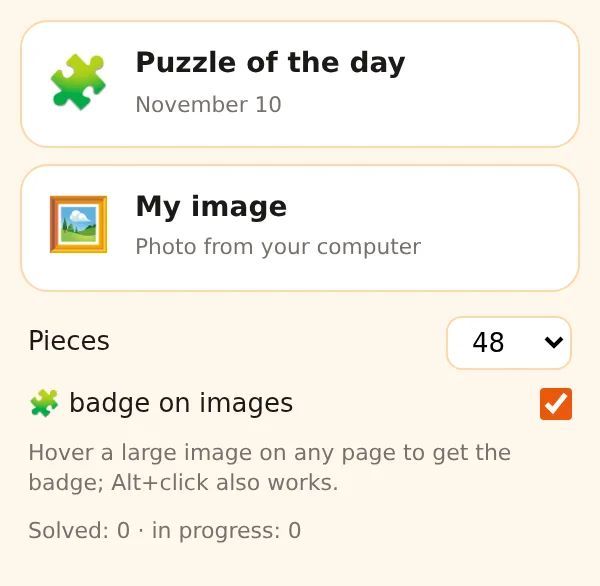
The state is saved for that picture and piece count — close the tab, open it tomorrow and continue. Up to 30 puzzles can be in progress. Or start the puzzle of the day, the same picture for everyone.
What you get
A jigsaw board that takes any picture you can see or own: a 48-piece coffee break from a news photo, a 300-piece weekend from a 20-megapixel landscape, a child's drawing from the phone. Pieces are cut on your device, saved puzzles and the solved count live in chrome.storage, and no image is uploaded — the only picture fetched is the daily one, from picsum.photos.
Museum night in
A Vermeer on the museum's collection page. 150 pieces, preview off, forty minutes of quiet.
Grandparents and the beach photo
Drop the holiday picture onto the puzzle page, 24 pieces, big enough to drag. It is saved for the next visit.
The daily one
Popup → Puzzle of the day, 48 pieces, timer on. Same picture as everyone else; compare times at lunch.
Compared with the usual ways of making a jigsaw
| Jigsaw websites | Their pictures; custom images behind sign-up and upload | Jigsaw Anything: Any image on any page or from your disk, no upload, no account |
|---|---|---|
| Puzzle apps | App store, in-app purchases for packs | Jigsaw Anything: Pictures are everywhere already — the badge turns them into puzzles |
| Cardboard jigsaws | One picture per box, missing pieces, table space | Jigsaw Anything: Thousands of pictures, saved progress, 12 to 300 pieces on demand |
FAQ
How do I make a jigsaw puzzle from a photo?
Hover a large image on any page and click the 🧩 badge, or open the popup and choose a photo from your computer. The puzzle page opens with the picture cut into your default number of pieces.
How many pieces can a puzzle have?
12, 24, 48, 96, 150 or 300. Change the count on the puzzle page; progress is saved separately for each count.
Are my photos uploaded anywhere?
No. The picture is loaded into a canvas inside the extension on your device and cut there; saved puzzles stay in Chrome's local storage. Only the puzzle of the day is fetched, from picsum.photos.
Can I finish a puzzle later?
Yes — the state of up to 30 puzzles is kept per picture and piece count. Open the same picture again and the board is as you left it.
What is free?
The badge, the puzzle page, saving progress and the puzzle of the day. Starting the first few puzzles is included; ExtSpace Pro removes that limit across all ExtSpace extensions.

Jigsaw Anything
Free Chrome extension that makes a jigsaw out of any image on any website or from your computer: real tab-and-blank pieces, 12–300 pieces, snapping, saved progress, daily puzzle. No upload, no account.
Add Jigsaw Anything to Chrome — free Noise — White Noise & Background Sounds
 Video Trimmer & Cutter